LLM Traffic Monitor
Understand how machines access and interpret your content.
LLM Traffic Monitor reveals when your pages are accessed, summarized, or influenced by AI, with crawler activity shown for context inside WordPress.
What is LLM Traffic Monitor?
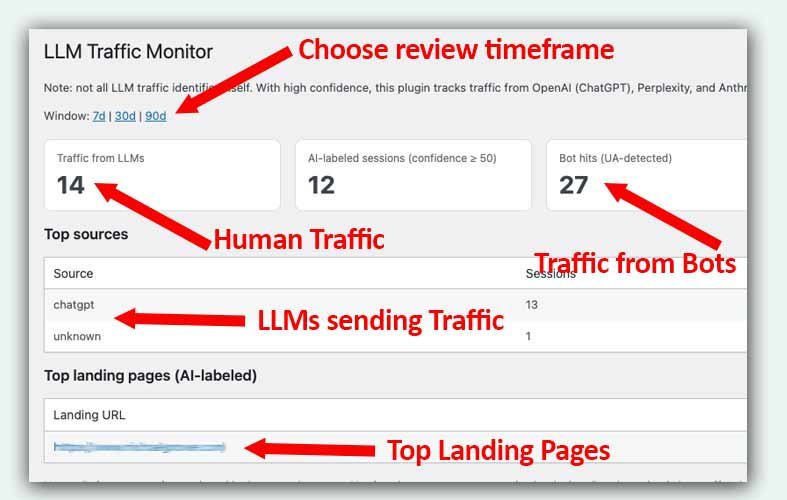
LLM Traffic Monitor gives you a quick view of how often AI systems and AI-assisted users interact with your site. While all this data is likely in your analytics system, LLM Traffic Monitor gives you a quick view, without having to dig through server logs or inflated claims.
It tracks identifiable LLM crawlers when they fetch your pages, and it conservatively labels human visits when there is evidence that an AI tool was involved in how the visitor arrived.
Why LLM Traffic Matters.
LLMs are being used more and more to help people discover products and services. This plugin will help you know if you're on the radar.
An At-a-Glance View of a Complicated Topic
Digging through analytics to find referrals is no picnic. This plugin helps because it's a quick view and it has confidence levels built in.
Who this is for
Marketers who want an easy way to get a sense of what kind of traffic they are getting from LLMs will like this because it's so easy to get a view. If you need to report up on LLM traffic, this is an easy way to make that happen.
Pricing
LLM Traffic Monitor Basic
Track traffic coming in from LLMs
Best for: Sites getting started on their AI journey.- Counts humans coming in from LLMs
- Tracks LLM bots visiting your pages
- Shows top landing pages
- Shows top LLMs
LLM Traffic Monitor Custom
Track traffic coming in from LLMs customized to your needs.
Best for: Sites serious about LLM traffic- Connect to your Analytics program
- Tracks humans and LLM bots visiting your pages
- Shows top landing pages
- Shows top LLM bots
Important Note:
I work hands-on with clients to install, configure, and tailor each tool to their site and needs.
Frequently Asked Questions
LLM Traffic Monitor provides an easy way to see what kind of traction you might be getting from LLMs. It shows the number of people who have clicked through from LLMS, how much LLM bot activity you have, what the top LLMs are, and the top landing pages.
Marketers who want to get a quick view of the activity they are seeing from LLMs can easily check this at-a-glance view to know how traffic is going.
The basic version is free. Connect with me and I’ll help you install it and get it running. If you have bigger ideas, the plugin can be customized to meet your needs. We can discuss how much a custom version is.
Yes, you can but LLM Traffic Monitor does two things for you:
- It’s a very simple way to access this data (it can be hard to find in your analytics program).
- The code does several things to score confidence that the reported traffic is legitimately from LLMs.
To download LLM Traffic monitor fill out the form at https://www.michaelgrover.com/products/llm-traffic-monitor/ or send an email to mg@michaelgrover.com.
Ready to Find Out About LLM traffic?
Submit the form below. Prefer email? mg@michaelgrover.com
What happens next?
Once you submit the form, you’ll hear back within 48 hours (weekends excepted) with recommendations on scope, timing, and next steps.
On this page, FAQs managed by FAQ Manager, Pricing and Response Form managed by Smart Offers Plus, and More tab managed by ExtraSpace