Sitemap Manager Shapes How Search and AI See Your Site
Your XML sitemap is a powerful signal to Google and other search engines. It helps search engines discover and prioritize your content.
Too bad it’s just a neglected list of URLs showing every published page, whether you want it there or not.
What is Sitemap Manager?
Most sites have a sitemap, a list of all available URLs on the site. It's one of the ways that search engines find out what urls there are to index on your site. But, the reality is that, just because a page is published doesn't mean you want Google to index it. That's where Sitemap Manager comes in.
Sitemap Manager helps you find and select URLs on the sitemap that really just get in the way of telling Google what you site is about. It allows you to filter and search your sitemap and instantly exclude low-value URLs.
What kinds of URLs do you want to exclude? Thank you pages from your newsletter sign-up page. Remnants of old campaigns or announcements of old trade show exhibits. How about the pages that many plugins create becasue the system requires everything to have a permalink?
- Shows Page Titles so you can understand your sitemap better
- Search your entire sitemap
- Filter by post type or parent directory
- Add non-Wordpress pages to your sitemap
- View Noindex pages with a button click
What is a “low-value page”?
A page that does not meaningfully support conversions and offers limited standalone usefulness to search engines, AI systems, or users.
- Terms & Conditions pages
- "Thank you" pages from your newsletter or any campaign
- Pages with clear visitor intent
- Pages that should be ranking but aren’t
Take a look at Sitemap Manager.


Three levers that Sitemap Manager helps you control.
Sitemap Manager is designed to help you improve communications, expand audience reach, and optimize system performance.
Improving communication
- Focus the story that your site is telling search engines.
- Make sure you're not telling an outdated story.
Helps focus what your site is about.
Expanding audience reach
- Make your important pages more discoverable.
- May improve the rankings of your other pages.
Helps position for site to be found for what you want.
Optimizing system performance
- Make better use of your crawl budget.
- Make it easier for search engines to understand your site.
Makes it easier for search engines to find higher value pages.
Why Choose Sitemap Manager Pro?
With Sitemap Manager Pro, you can make sure that your sitemap is telling the story you want to tell. Whether it's old campaign pages or pages that were published just to show your client, Sitemap Manager Pro makes it each to exclude them from your sitemap. And that will help keep them out of Google's index.
- Instant exclude You can make sure that any post, page, or custom post type that you don't want in your sitemap isn't inadvertently being fed to Google and other search engines.
- Beyond WordPress Do you have pages outside of your WP site? With Sitemap Manager Pro, you can add static HTML pages outside WordPress for complete site coverage. (These pages will not be included otherwise.)
- Enhanced Readability Your sitemap will be a lot easier to understand because the view in Sitemap Manager Pro shows you the page title of each page. You can even export your sitemap to make decisions offline.
- SEO Plugin Compatible Sitemap Manager Pro works seamlessly with Yoast, Rank Math, AIOSEO, and the native WordPress sitemap. You can even switch SEO Plugins and Sitemap Manager Pro won't miss a beat.
- Get to know your sitemap Fast, visual UI with search, filters (by CPT and top-level directory), and pagination—so the pages that tell your story are always included.


Who this is for
Sitemap Manager Pro is for marketers, SEOs, and people who want to make sure their site is in tip-top shape for the search engines.
Pricing
Sitemap Manager Basic
Test how the basic system works.
Best for: Sites who want basic control over their XML sitemap- Basic functionality
- Download from WordPress Plugin Directory
Sitemap Manager Pro 500+
Sites w more than 500 URLs
Best for: Sites with larger sitemaps they need to control.- Search sitemaps by title or url
- Filter by directory or CPT
- Enhanced Readability
Sitemap Manager Custom
Unlimited URLs and Unlimited Sites
Best for: Sites who want custom integration- Custom integration
- Filter by directory or CPT
- Enhanced Readability
Important Note:
Sitemap Manager Pro does not have a user-facing interface. Unlike off-the-shelf WordPress plugins, I work hands-on with clients to install, configure, and tailor each tool to their site and needs.
Frequently Asked Questions
It gives you direct control over your sitemap contents. Exclude specific posts/pages, add custom URLs that aren’t part of WordPress, and analyze your sitemap with filters (by type, by directory) and search.
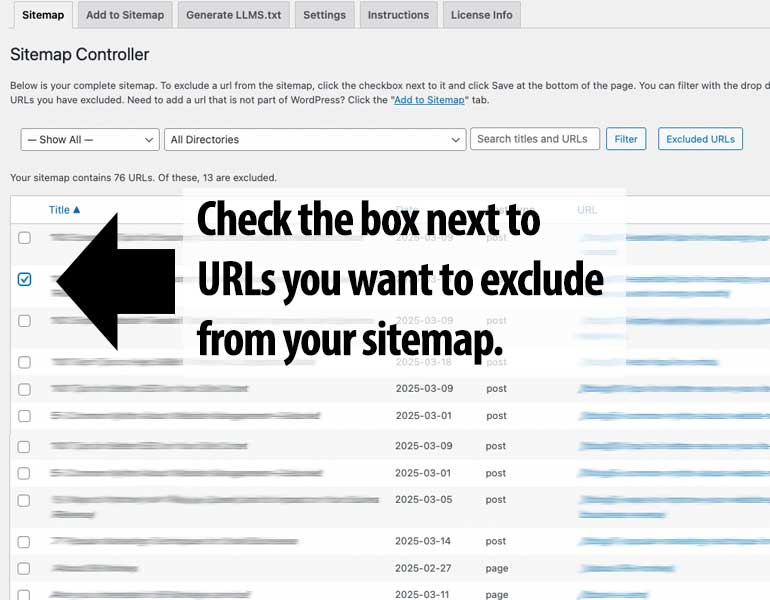
Under the sitemap tab, you’ll see your xml sitemap in a much more accessible form. First off, it shows the title of the page, not just the URL. You can also search or filter by directory or post type. Then, check the box next to any item you want to exclude, hit save, and those items are immediately removed from your xml sitemap.
There is no limit. In fact, large sitemaps can benefit much more from Sitemap Manager Pro’s filtering and searching function to make sure that pages that need to be excluded are kept out of the sitemap. Large sites might want to consider Sitemap Manager Custom so that the system is integrated with yours.
Not at all. Sitemap Manager Pro has been tested with the sitemaps generated by Yoast, Rank Math, AIOSEO, and the WordPress native sitemap. Sitemap Manager Pro adapts to whichever you choose to use.
Sitemap Manager Custom integrates the plugin into your site in a custom way. One example is that there might be specific pages you want auto-excluded. That can be made to happen with Sitemap Manager Custom.
Ready to control your sitemap?
Submit the form below. Prefer email? mg@michaelgrover.com
What happens next?
Once you submit the form, we’ll review your site and you’ll hear back within 48 hours (weekends excepted) with recommendations on scope, timing, and next steps.
On this page, FAQs managed by FAQ Manager, Pricing and Response Form managed by Smart Offers Plus, and More tab managed by ExtraSpace