FAQ Manager: Make Your Content Work for Readers and Machines
Modern search engines and AI systems want clear, trustworthy answers fast. Humans do, too. That’s where FAQ Manager comes in.
Content marketers use FAQ Manager to create, organize, and manage informative product Q&As across an entire site. The result: people, search engines, and AI get clear, concise, and easy-to-digest answers.
What is FAQ Manager?
FAQ Manager gives marketers a central system for writing, managing, and publishing questions and answers that offer additional details about products and services. It's a one-stop spot for creating FAQs that run on pages across your entire site.
What's so valuable about the way FAQ Manager outputs your Q&As is that it integrates FAQPage Schema so these clear, structured questions and answers can be understood and trusted by search engines and AI systems, while still engaging to human visitors.
You can think of it as a CMS for FAQs: you write questions and answers once, assign them to one or more Answer Hubs, and they display wherever they belong.
FAQs in Action
Every product on this site uses FAQ Manager to manage and display its FAQs, including this page. Here's the FAQ for FAQ Manager.
What makes it different? FAQ Manager supports Embedded FAQs, allowing content professionals to insert specific questions and answers directly into their articles, landing pages, and product pages right where clarity matters most.

What are Frequently Asked Questions?
Historically, FAQs were a way to offer additional explanation not covered in the product page. But, in the age of AI and search (and short attention spans), FAQs can provide a machine-readable and human-friendly synopsis of your entire product.
Good FAQs reduce friction by answering questions clearly and directly, right when someone needs them. They help visitors make decisions faster.
And they happen to be a format, especially when the FAQPage-Schema is incorporated, that AI and search engines really love. They are an ideal way to convey to search engines and LLMs information about your product.
"AI doesn't want your 500-word intro...it wants the answer."
Rick Kranz, AI Marketing Automation Lab, The New Rules of AI Search Webcast
Why do FAQs Matter Now?
FAQs are a very efficient way to make your content understandable to both search engines and AI. While not alienating human visitors, FAQs pair clear questions with explicit answers, which is exactly the Problem/Solution structure modern systems look for when trying to interpret meaning, intent, and relevance.
Well-written FAQs help search engines surface your content for long-tail, high-intent queries, and they give LLMs reliable, on-site answers to reference instead of ignoring you and moving on to third-party sources.

A Smart FAQ Strategy.
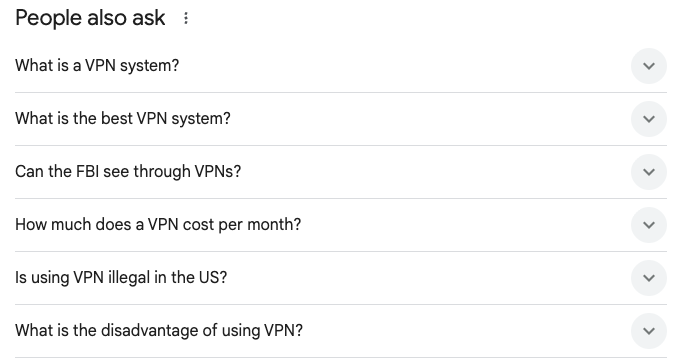
You can also check out AlsoAsked.com to get the PAA questions in bulk.
FAQs have always been a good SEO strategy and one of the most frequently-cited best-practices is to tap into Google's "People Also Asked" section. Many of these user-behavior based questions can be answered naturally in your product page’s FAQ section, which helps your page become eligible to appear in those results.
Beyond visibility, this approach ensures your FAQs are grounded in actual search demand, not assumptions, making them more useful for visitors and more meaningful to search engines and AI systems alike.
Done right, FAQs don’t just help you rank. They help ensure that when your site is summarized, cited, or answered by Search and AI systems, the information is accurate, current, and actually reflects how you want your business explained.
FAQ Manager has important features built-in.
Built-in FAQ Schema (No Setup Required)
The all-important FAQ Schema is completely built into FAQ Manager. You don't need to do anything that tap into it's power.
Draft, Review, and Publish Answers on Your Timeline
When you are writing answers to your FAQs, you can set them to inactive so they don't appear on the site until you're ready.
Reusable Answer Hubs Across Pages
Each FAQ is assigned to one or more answer hubs to make sure they appear on the right page. You can generate new answer hubs as quickly as just typing the name of the new group.
How Does FAQ Manager Work?
Write your questions and answers
Inside the Admin FAQ Manager, add your Questions and Answers. Be thorough but not overwhelming. Add screenshots and other media if it helps answer the question.
Select an Answer Group
Pick (or add) an Answer Group. This will determine how the Answer is used on the site. You can select more than one Answer Group.
Sort questions within the Answer Group
Put the FAQs in an order that makes sense. Generally speaking, the more important ones should go first.
Build a Question Library
Feel free to add more questions as they come up.
Pricing
FAQ Manager – Single
A complete Q&A management system for a single domain.
Best for: Product-driven sites that need consistent, reusable answers across search, AI, and human experiences.- Built-in FAQ Schema
- Full multimedia answers
- Limited to one domain
- Unlimited Answer Hubs
FAQ Manager Pro
A complete multi-domain Q&A management system including modules for Support and Business.
Best for: Product-driven networked sites that want to to use for Support FAQs.- Everything from Single plus...
- Includes Support and Business Modules
- Unlimited domains under your control
FAQ Manager Custom
FAQ Manager customized to your site.
Best for: Sites with specific goals for FAQs across search, AI, and human experiences- Built-in FAQ Schema
- Full multimedia answers
- Customized to your needs
- Installation, Configuration Help
Important Note:
FAQ Manager integrates directly with your site’s existing theme, inheriting its typography, colors, and layout, with flexible CSS overrides when needed. Unlike off-the-shelf WordPress plugins, I work hands-on with clients to install, configure, and tailor each tool to their site and needs.
Frequently Asked Questions
FAQ Manager is a tool that gives marketers a central system for writing, managing, and publishing questions and answers that offer additional details about products and services. It’s a one-stop spot for creating FAQs that run on pages across your entire site. FAQ Manager integrates FAQPage Schema so these clear, structured questions and answers can be understood and trusted by search engines and AI systems, while still engaging to human visitors.
The basic program for use on one domain is $99/year. Optionally, you can buy an Installation and Training module for $499 (one-time) that includes setting up your Answer Hubs.
A Pro version will be coming out. FAQ Manager can also be custom built based on your needs.
Yes, the FAQ Schema (technically called the “FAQPage Schema”) is incorporated in FAQ Manager. All of the questions are provided in this highly machine-readable format.
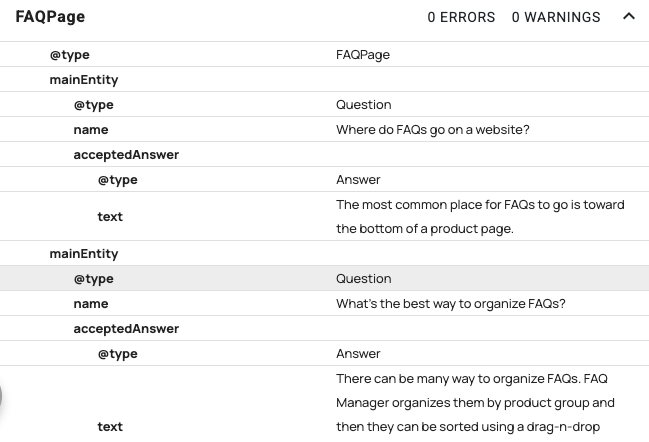
The most common place for FAQs to go is toward the bottom of a product page.
An Embedded FAQ is a single frequently asked question and answer that can be inserted anywhere on a website using a shortcode.
Instead of displaying an entire FAQ page or category, Embedded FAQs allows you to place one or two specific question and its answer contextually inside a blog post, landing page, product page, or article.
This makes it easy to:
- Highlight an important clarification exactly where it’s needed
- Reinforce a key message without forcing users to leave the page
- Reuse authoritative answers across multiple pages
- Improve clarity for both readers and AI systems that analyze page content
There can be many way to organize FAQs. FAQ Manager organizes them by product group and then they can be sorted using a drag-n-drop system in the order of importance.
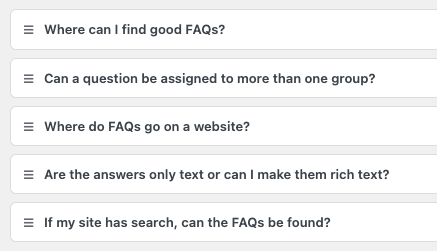
- Questions that are too “salesy”
- Too many questions
- Technical language (jargon)
- Lack of organization
Your FAQs should contain the answers that define how your product works, who it’s for, and what happens next. Clear, structured answers help both people and AI systems understand your offer.
Focus on real customer questions, especially the ones that affect trust, pricing, setup, limitations, and outcomes.
Include objections, clarifications, pricing concerns, implementation details, and common misunderstandings. If it’s something a prospect hesitates about, asks in sales calls, or searches for before buying, make room for it in your FAQ.
FAQs are real content, but some sites limit search to posts and pages only. If you want FAQs to appear in search results, your administrator just needs to allow the FAQ (faq) post type in search.
The number one best-practice place to find additional question is tapping Google’s People Also Asked (PAA) questions. Do a relevant search of Google and more often than not you’ll see a set of similar queries that other people are making. Take thos questions and answer them from you point of view. This will help you rank for those queries.

Yes, FAQ Manager allows questions to be assigned to more than one group. This will make the question appear in both FAQs.
The way to think about the answers is that anything you can put in a post, you can put in an answer.
- A screenshot
- A slideshow
- A link to documentation
- A CTA button shortcode
- Embed a video or audio clip
Want to learn more about using FAQ Manager?
Submit the form below and we’ll review your site and follow up with next steps. Prefer email? mg@michaelgrover.com
What happens next?
Once you submit the form, you’ll hear back within 48 hours (weekends excepted) to discuss your needs and to schedule a demo.
On this page, FAQs managed by FAQ Manager, Pricing and Response Form managed by Smart Offers Plus, and More tab managed by ExtraSpace